
How to Start a Blog and Rank on Google in 2026 (Beginner’s Step-by-Step Guide)
If you have been thinking about starting a blog, this is probably the best time to do it.
Blogging in 2026 is no longer just about sharing ideas. It has become one of the most practical ways to build an online brand, generate passive income, sell services, and even grow a full-time business.
But here’s the truth: simply starting a blog is not enough.
If you want traffic, leads, or income, you need to know how to start a blog the right way and how to rank it on Google.
The process is simple:
Choose a niche, buy a domain, get the best hosting for beginners, install WordPress, and start publishing content that solves real problems.
That sounds easy, but the real difference comes from making smart decisions in the beginning.
This guide will walk you through everything.
How to Start a Blog for Beginners?
If you are a complete beginner, starting a blog can feel overwhelming.
Questions like:
- Which platform should I choose?
- Which is the best blog hosting for beginners?
- How much does it cost?
- Can I start without coding?
The answer is yes—you can.
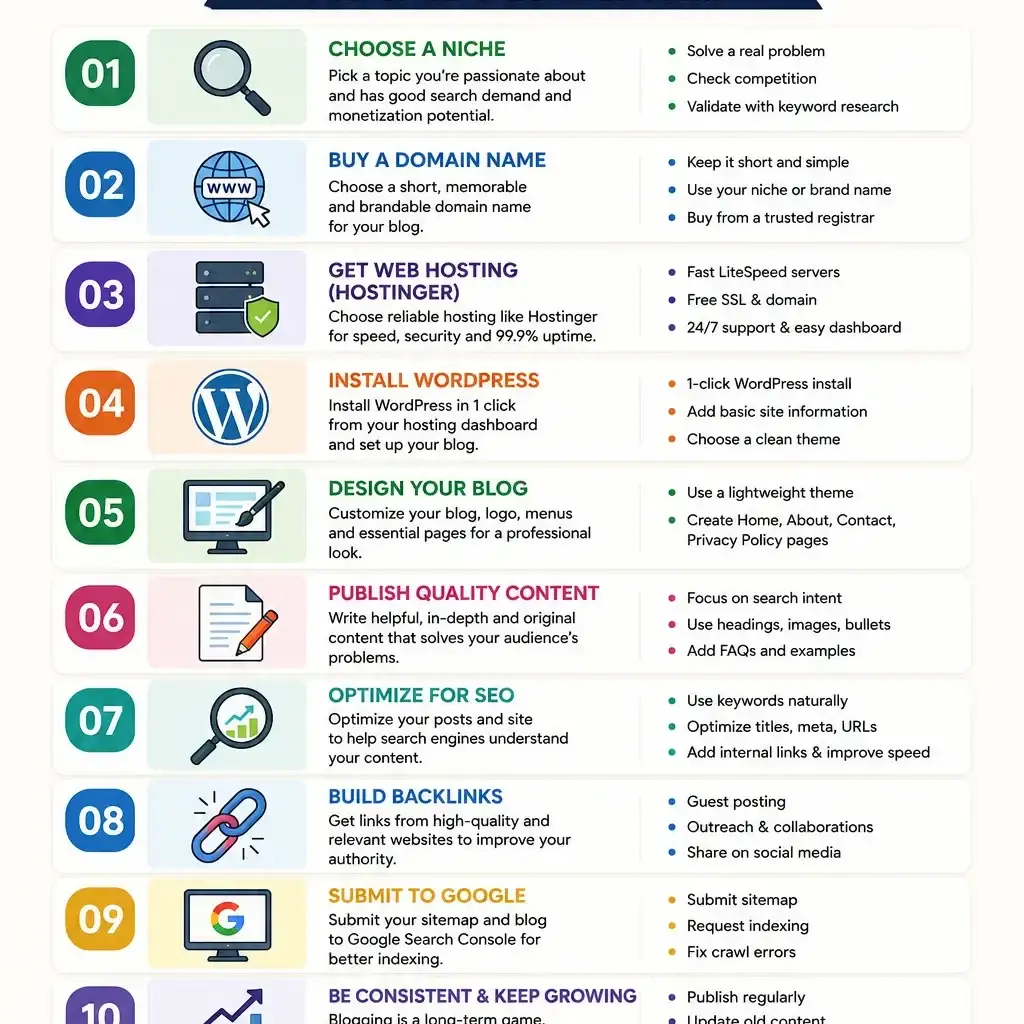
To start a blog, follow these steps:
- Pick a niche
- Buy a domain
- Get hosting
- Install WordPress
- Design your blog
- Write your first post
- Optimize for SEO
- Promote your content
That’s the foundation of every successful blog.
The good part? You do not need technical knowledge.
What is the Best Niche to Start a Blog?
Before you buy anything, choose your niche.
Your niche decides your audience, content strategy, and earning potential.
A good niche should:
- Have enough search volume
- Solve a real problem
- Have affiliate or product opportunities
- Be something you can consistently write about
Some profitable niches include:
- Digital marketing
- Finance
- Travel
- Fitness
- AI tools
- Education
- Blogging
- Technology
For example, if you choose blogging itself, you can create articles like:
- Best affordable hosting for bloggers
- How to make money blogging
- Hostinger review for bloggers
- Best WordPress hosting for beginners
That creates strong topical authority.
How to Choose a Domain Name for Your Blog?
Your domain is your blog’s identity.
Think of it like your online address.
A good domain name should be:
- Short
- Easy to type
- Easy to remember
- Relevant to your niche
For example:
If your niche is content writing:
- WriteHive.com
- ContentNest.com
- RankWrite.com
Avoid complicated names.
Simple domains usually perform better for branding.
Which is the Best Hosting for Beginners?
This is one of the most important decisions.
Your hosting affects:
- Website speed
- Uptime
- Security
- SEO
- User experience
If your site loads slowly, people leave.
And when people leave quickly, Google notices.
That’s why choosing the best affordable hosting for bloggers matters.
For beginners, Hostinger is one of the strongest choices.
Why?
Because it offers:
- Low starting price
- Free domain
- Free SSL
- Fast LiteSpeed servers
- One-click WordPress install
- Free email
- Beginner-friendly dashboard
If you are looking for cheap hosting for WordPress blogs, Hostinger gives great value without compromising speed.
Is Hostinger Good for Blogging?
Short answer: Yes.
This is one of the most searched high-intent questions.
If your goal is to build a fast blog, run affiliate content, or create niche websites, Hostinger works very well.
Why bloggers choose Hostinger:
- Fast loading times
- Better Core Web Vitals
- Easy setup
- Lower renewal cost compared to many competitors
Many beginners compare Hostinger with Bluehost.
But if budget and performance matter, Hostinger often wins.
That’s why it is often recommended as the best hosting for blogging.
How to Install WordPress on Hostinger?
Once your hosting is ready, installing WordPress takes only a few minutes.
Steps:
- Login to your Hostinger account
- Open Auto Installer
- Select WordPress
- Enter site details
- Click Install
Done.
Your blog is live.
WordPress powers more than 43% of all websites, and for good reason.
It is flexible, beginner-friendly, and SEO-friendly.
What Pages Should Every Blog Have?
Before writing blog posts, create these pages:
Home Page
Your main introduction.
About Page
Tell readers who you are.
Contact Page
Build trust.
Privacy Policy
Important for legal compliance.
Disclaimer
Very important for affiliate websites.
Blog Page
Where your articles are displayed.
These pages also help if you plan to apply for Google AdSense or affiliate programs.
How to Write Blog Posts That Rank on Google?
This is where most bloggers fail.
They write content but forget search intent.
Google ranks helpful content.
To write content that ranks:
- Solve a real problem
- Use simple language
- Answer questions directly
- Add examples
- Keep paragraphs short
- Use internal links
- Add FAQs
For example:
Instead of writing:
“Blogging is important.”
Write:
“Blogging helps businesses generate organic traffic, build trust, and create long-term passive income.”
That is clearer and more useful.
How to Do SEO for Blog Posts?
SEO is what helps your content get discovered.
Here’s what matters:
Use Keywords Naturally
Your main keyword should appear in:
- Title
- URL
- First paragraph
- Headings
- Conclusion
Optimize Meta Title
Example:
How to Start a Blog and Rank on Google
Improve Site Speed
A fast website ranks better.
This is why many people invest in fast hosting for SEO.
Add Internal Links
Link your related posts.
Use Optimized Images
Compress images and use alt text.
Focus on User Experience
Easy navigation matters.
How to Rank a Blog Faster on Google?
Ranking takes time, but here’s how you can speed it up:
- Target low competition keywords
- Publish consistently
- Build backlinks
- Update old posts
- Improve site speed
- Submit sitemap in Google Search Console
One important tip:
Start with buyer-intent keywords like:
- Best hosting for beginners
- Hostinger review
- Hostinger vs Bluehost
- Best WordPress hosting for beginners
These keywords often convert better.
How Long Does It Take to Rank a Blog?
Most blogs start getting traffic in 3 to 6 months.
But it depends on:
- Competition
- Keyword difficulty
- Content quality
- Domain authority
- Backlinks
If you choose easier keywords, results can come faster.
Blogging rewards consistency.
Frequently Asked Questions
1. How much does it cost to start a blog?
You can start a blog for around ₹149–₹299 per month with Hostinger.
That usually includes hosting, SSL, and sometimes a free domain.
2. Which is the best hosting for beginners?
For most beginners, Hostinger is one of the best options because it is affordable, fast, and easy to use.
3. Can I start a blog without coding?
Yes. With WordPress, you do not need coding knowledge.
Everything is beginner-friendly.
4. Is blogging still profitable in 2026?
Yes.
Blogging is still profitable through:
- Ads
- Affiliate marketing
- Selling services
- Digital products
- Sponsorships
5. Is Hostinger good for affiliate blogs?
Yes.
Hostinger is widely used for affiliate blogs because it offers speed, affordability, and beginner-friendly features.
6. How do beginners make money from blogging?
Beginners make money through:
- Google AdSense
- Affiliate marketing
- Freelancing
- Selling courses
- Consulting
Final Thoughts
Learning how to start a blog is not difficult.
The difficult part is staying consistent.
Most people quit too early.
If you choose the right niche, invest in the best blog hosting for beginners, publish valuable content, and focus on SEO, your blog can become a long-term asset.
If you are just starting out, Hostinger is one of the smartest choices because it combines affordability, speed, and simplicity.
Start now.
A year from today, you will be glad you did.